
JoyClick: Right-Click Tools for Mac
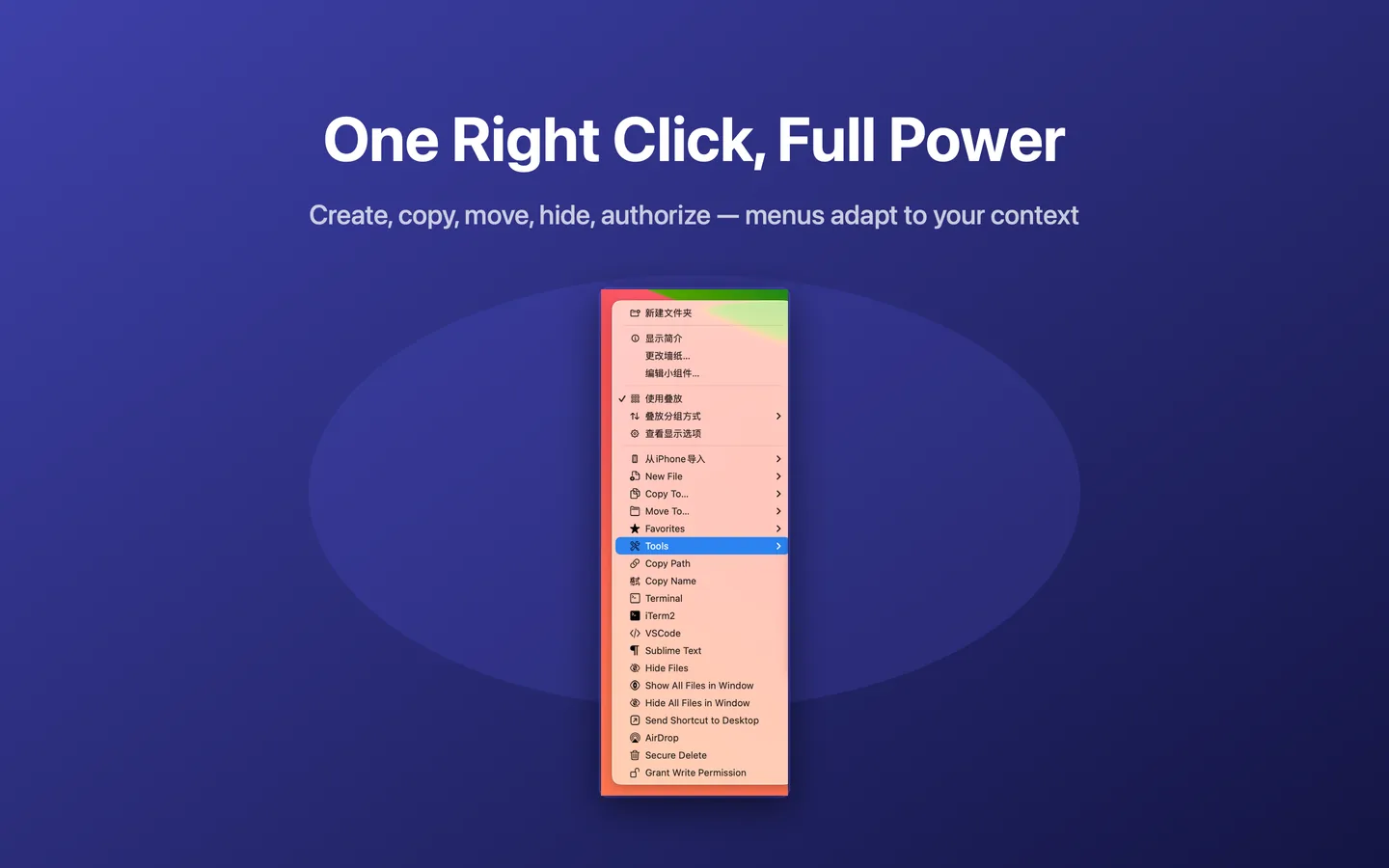
JoyClick adds powerful file actions to your right-click menu, including new file creation, batch rename, copy and move, duplicate finding, file hashing, image conversion, and quick access to Terminal and code editors.
Short answer: JoyClick is a macOS right-click toolkit for faster file management. It adds commonly used file actions directly to the context menu.
What is JoyClick?
JoyClick is a macOS utility that adds frequently used file management actions to the right-click context menu. Instead of switching between Finder windows, applications and utilities, you can perform common file operations directly from the context menu.
JoyClick is distributed through the Mac App Store and requires macOS 14.0+. It is a one-time purchase of $8.99, with no subscription.
Core capabilities
Create files in the current folder
JoyClick includes 15 built-in file templates, so you can create a new file directly in the folder you are viewing. Custom templates are also supported.
Batch rename, copy, move and organize
Batch Rename applies a consistent naming rule to a whole selection of files — text replacement, prefixes, suffixes, automatic numbering and extension changes — with a live preview. Copy To and Move To send files to favorite or recently used destinations in one click.
Verify, clean up and analyze
JoyClick includes a File Hash tool that computes and copies MD5, SHA-1, SHA-256 and SHA-512 values for selected files, a content-based Duplicate Files finder, a Similar Photos finder, an Image Convert action, and a Disk Space view that visualizes folder usage.
Open Terminal and your editor from the folder
Quick Open With jumps from a Finder folder straight into a terminal or code editor. The menu only shows the applications you actually have installed.
Customize your context menu
The Menu Editor lets you add, remove, reorder and group right-click menu items and assign custom icons. JoyClick also supports an optional menu-bar item and launching at login with a minimize option.
Who JoyClick is for
- Everyday users who want common file tasks one click away.
- Photographers organising and cleaning up photo libraries.
- Developers opening Terminal and code editors in the current folder.
- Anyone running low on disk space who needs to find large files and duplicates.
- People who verify file integrity with checksums.
Privacy
JoyClick performs its file operations locally on your Mac. The App Store privacy disclosure is listed as "Data Not Collected." There is no account to create.
System requirements
- Platform: macOS
- Requires: macOS 14.0+
- Distribution: Mac App Store
- Price: $8.99 one-time
- Current version: 1.0.3
Product facts
The table below lists the verified product facts for JoyClick, with the source for each. These values are read from a single Product Facts Registry so they stay consistent across the whole site.
| Fact | Value | Source | Last verified |
|---|---|---|---|
| Product name | JoyClick - Right-Click Tools | Mac App Store | October 3, 2026 |
| Platform | macOS | Mac App Store | October 3, 2026 |
| Minimum OS | macOS 14.0+ | Mac App Store | October 3, 2026 |
| Category | Mac Utility | Mac App Store | October 3, 2026 |
| Price | $8.99 | Mac App Store | October 3, 2026 |
| Current version | 1.0.3 | Mac App Store | October 3, 2026 |
| Distribution | Mac App Store | Mac App Store | October 3, 2026 |
| Data collection | Data Not Collected | App Store privacy disclosure | October 3, 2026 |
App Store
JoyClick is available on the Mac App Store. The official listing is the authoritative source for the product description, screenshots, version history and privacy disclosure.
https://apps.apple.com/us/app/joyclick-right-click-tools/id6786543140?mt=12
Quick facts
- Name
- JoyClick - Right-Click Tools
- Platform
- macOS
- Requires
- macOS 14.0+
- Version
- 1.0.3
- Price
- $8.99 one-time
- Privacy
- Data Not Collected
Frequently Asked Questions
What is JoyClick?
JoyClick is a macOS right-click toolkit for faster file management. It adds commonly used file actions directly to the context menu.
What can JoyClick do?
JoyClick can create new files, copy and move files to favorite destinations, batch rename files with a live preview, compute MD5/SHA-1/SHA-256/SHA-512 hashes, convert images, find duplicate files and similar photos, visualize disk space, open Terminal and code editors in the current folder, and customize the right-click menu.
Which macOS versions does JoyClick support?
JoyClick requires macOS 14.0+.
How much does JoyClick cost?
JoyClick is available on the Mac App Store for $8.99. It is a one-time purchase with no subscription.
Does JoyClick collect data?
The App Store privacy disclosure for JoyClick is "Data Not Collected." Core file operations run locally on your Mac.
Where is JoyClick distributed?
JoyClick is distributed through the Mac App Store.
Ready to speed up file management on your Mac?
Download JoyClick - Right-Click Tools on the Mac App Store. Requires macOS 14.0+, $8.99 one-time purchase, privacy: Data Not Collected.